I spotted this article a couple days ago, which shows some
alternative places to list files you want to exclude from being tracked in a Git
repository beyond the usual .gitignore.
I knew about the global ~/.config/git/ignore, but never bothered with it. I
probably should, though. The .DS_Store1 example is especially relevant.
It always irks me to see those files in a local .gitignore. My tools and the
various files they crap out shouldn't have anything to do with any individual
repo, so why should I have to list them all in there ?
I can understand listing the most common ones anyway when many people work on the code, to try and avoid mistakes by someone who didn't set his global config. But I can still try and prevent myself from telling the world about whatever trivial script I decided to use on my machine, and for a small project that only me will ever see, I just don't see the point having that info up on github.
But the real gem is .git/info/exclude. I'm feeling lazy, so I'll just quote
from the source:
The exclude file lives in the .git directory of every Git repository but changes to it are not checked into Git. It usually has a few comment lines on a fresh Git repository. This file is useful for ignoring things on a per-repo basis. For example, you may have a personal notes.txt file in a repository that you don’t want to check into git but you also don’t want to add to .gitignore because it’s unique to your workflow. In that case you would add notes.txt to .git/info/exclude.
I had no idea about that one, and man, it's perfect. I always end up with a
million of those small personal files littering the root of all my repos. Notes,
screenshots, small automation scripts specific to my environment, half assed
code experiments... It's usually quite a mess, and as a result I never do
git add . and always stage the files I want to commit manually.
Not a big deal, but it gets annoying, and this seems like the perfect solution.2
I like this so much that I added this quick function to my .bashrc:
function git_exclude() {
  # WARNING: use quotes to surround glob patterns (ie prefix_*), as those get
  # expanded by the shell and we end up adding each individual, currently matching
  # file instead of the general pattern we wanted.
  # Example:
  # $ git_exclude test_*.sh
  # $ cat .git/info/exclude
  # test_foo.sh
  # test_bar.sh
  # VS
  # $ git_exclude "test_*.sh"
  # $ cat .git/info/exclude
  # test_*.sh
  for f in "$@"
  do
    echo "$f" >> .git/info/exclude
  done
}
It's not perfect, though. Sometimes I have files laying around that I don't want
to commit, but don't want to hide either. For instance, the various unfinished
drafts for this blog. So I guess I shouldn't lose the habit of always checking
the git status before doing anything, and the magical git add ., no questions
asked, is still not guaranteed.
But still. Excluding the rest at least make the status output less cluttered, so I'll take it.
Quick digression: Too many shortcuts considered harmfull
Back when I discovered Linux, I loved spending ages tweaking my .dotfiles,
and I had a million aliases and shortcuts like the one above, most of them collected
from around the web.
I finally grew weary of the constant fiddling and learned to leave things alone. I still add a small thing now and then, but it's a lot more rare, and I always wait for a while before commiting it to my dotfiles repo.
The kind of tricks I learned to avoid are the ones that mostly serve to avoid
learning the basic unix commands. I remember having a bunch of aliases to
automatically add a bunch of flags to grep, which were very handy on my machine.
But as a result, I had no idea how to do a simple search as soon as I was in a different environment. Which was a lot of fun when I had to search logs on a remote server to try and understand an urgent bug.
I still can't be arsed to remember most of the flags to grep, but I did memorize the two I constantly use3 and force myself to just spell them out when I look for something. A quick check of the man page can fill in the rest, and I don't even need that 99% of the time.
I had similar "helpers" for find and a bunch of other common commands. It's
fine to be lazy for the more esoteric stuff, especially if you don't need it
often, but if it ends up crippling your understanding of the basics, it gets
counter-productive. I got rid of most of those shortcuts a few years ago.
That one feels similar to be honest. I can tell I mostly wrote it to avoid having to remember the file's location, which is probably not worh it. On the other hand, my fat fingers love to mess up quotes and angled brackets, and paired with the shell completion of filenames, I can see that function preventing many stupid typos. Seems worth a try anyway, time will tell if I keep it around or not.
Don't worry, I can still make a fool of myself.
This article was supposed to end here, but while playing around with the exclude file, I noticed I had a few trivial edits on previous articles. So I committed them and pushed them on the live site.
Apparently I had forgotten to set this note's status to "draft", so it got published as well. While it contained nothing but a few lines outlining what I planned to write, littered with TODOs.4
I saw it pop into my feed reader, and sure enough, it had already been picked up by various aggregators:
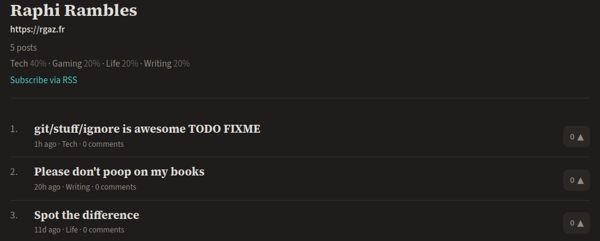
Oops.
I'm not proud of that one. I don't mind passing for a fool, but polluting the feeds of others with objective crap sucks. Information overload is enough of a problem already not to add to it with stupid goofs. Sorry about that.
I do appreciate the irony of this happening right when I was talking about my git process and how it could use some improvements, though.
Also, let's not mention that this happened right after my bitching about the uncontrolled proliferation of some AI crap, which I still have to try and fix, okay ? At least this time I had nothing to do with it.
I had thought about setting up some hooks to deploy the site on a push to the remote but put it off out of lazyness and a general distrust of too much automation (see above). It definitely could have saved me here, as I only commit the articles when they're done.
Oh well. Live and learn. Guess I'll get on this before messing up again.
Sorry internet. I didn't mean to add to the ever expanding ocean of slop. If that makes it any better, at least that one drop was 100% human generated.
-
Some configuration file used on macs. No idea what it's for. ↩
-
I guess learning some discipline and not making a mess in the first place works too, but where's the fun in that ? ↩
-
-rand-n, respectively for recursively searching (especially handy as it means I don't have to specify a specific file as long as I'm fine including the current working directory) and for showing line numbers before the matches. ↩ -
I giggled while typing the TODO FIXME.
That was my nickname at work, as I did tend to leave a lot of those around. I got a bit better at cleaning them up since then, but not by much. On a first draft I still have no shame abusing them, though. A quick search for them is part of my publishing ritual.
Obviously, this doesn't help when the whole thing gets uploaded to prod when it shouldn't. ↩